

Where to find cloud metadata
In the RisingWave Cloud dashboard, open your cluster and click Network Access in the cluster navigation. Then select the Cloud Meta tab.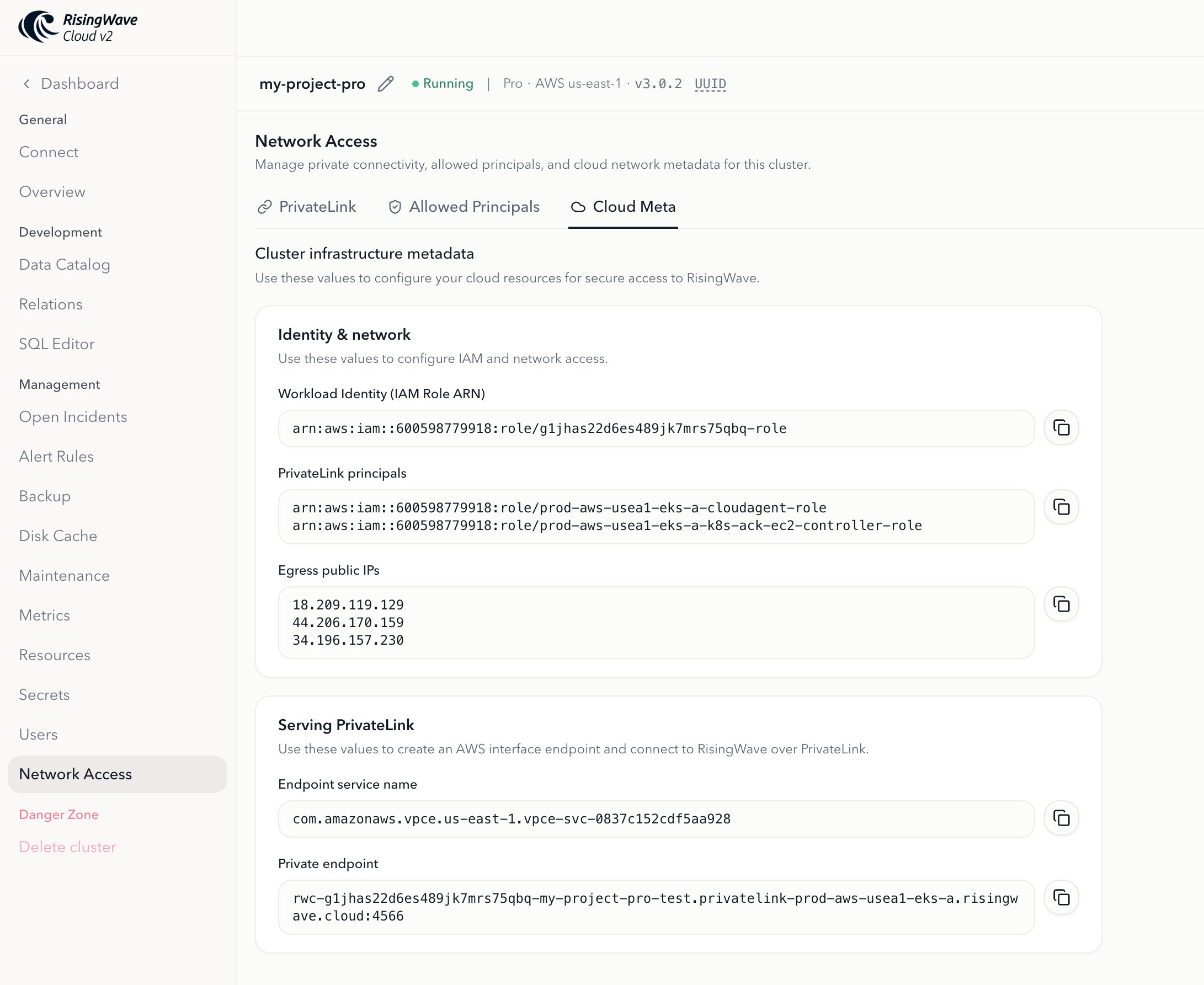
Cloud metadata is only available for clusters on the Standard plan or above.
Metadata fields
- AWS
- GCP
Workload Identity (IAM Role ARN)
The AWS IAM role ARN that RisingWave Cloud uses to access AWS resources on behalf of this project. When you configure IAM role assume (cross-account S3 access), you add this ARN as a trusted principal in your IAM role’s trust policy.
PrivateLink principals
The AWS principals associated with the RisingWave Cloud deployment that hosts your project. When you create a PrivateLink endpoint service in your AWS account, add these principals to the list of Allowed principals so that RisingWave Cloud can connect to your service.
Serving PrivateLink
The Serving PrivateLink card lets you connect to RisingWave Cloud privately from your own AWS VPC, without routing traffic over the public internet. RisingWave Cloud creates an AWS endpoint service on its side; you then create an AWS Interface VPC Endpoint in your VPC to connect to it.Endpoint Service Name
The name of the AWS endpoint service created by RisingWave Cloud for your project. Use this value when creating an Interface VPC Endpoint in your own AWS account:
- Open the Amazon VPC Console and navigate to Endpoints → Create endpoint.
- Select Other endpoint services and paste the Endpoint Service Name into the Service name field.
- Choose the VPC and subnets from which you want to access RisingWave Cloud.
- Complete the endpoint creation. The endpoint remains in a Pending acceptance state while RisingWave Cloud reviews and approves the request. Approval is automatic for endpoints in the same AWS account. If you are using a different AWS account, contact our support team to have the endpoint approved.
Private Endpoint
The hostname and port to use when connecting to RisingWave Cloud privately from your VPC, after the Interface VPC Endpoint is provisioned and accepted. Replace the public RisingWave Cloud hostname with this value in your connection strings and client applications.
The Private Endpoint value is only available after the Interface VPC Endpoint in your AWS account transitions to the Available state. If the field is empty, the endpoint has not yet been accepted or provisioned.
Egress public IPs
The public IP addresses from which outbound traffic from this project originates. Add these IPs to the allowlist of any firewall rules or security groups that restrict inbound access to your services (for example, a database or Kafka cluster that RisingWave connects to).
Cloud metadata by platform
Next steps
- Set up IAM role assume — use the IAM role ARN to grant RisingWave Cloud cross-account S3 access.
- Configure PrivateLink — use the PrivateLink principals when setting up your endpoint service’s allowed principals.
- PrivateLink overview — learn how RisingWave Cloud uses PrivateLink for private connectivity between your VPC and RisingWave Cloud.