

postgres-sink demo in the integration_test directory of the RisingWave repository.
Set up a PostgreSQL database
- AWS RDS
- Self-hosted
Set up a PostgreSQL RDS instance on AWS
Here we will use a standard class instance without Multi-AZ deployment as an example.- Log in to the AWS console. Search “RDS” in services and select the RDS panel.
- Create a database with PostgreSQL as the Engine type. We recommend setting up a username and password or using other security options.
- When the new instance becomes available, click on its panel.
- From the Connectivity panel, we can find the endpoint and connection port information.
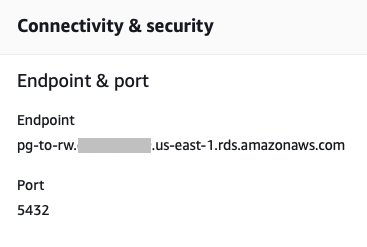
Connect to the RDS instance from Postgres
Now we can connect to the RDS instance. Make sure you have installed psql on your local machine, and start a psql prompt. Fill in the endpoint, the port, and login credentials in the connection parameters.Create a table in PostgreSQL
Use the following query to set up a table in PostgreSQL. We will sink to this table from RisingWave.Set up RisingWave
Install and launch RisingWave
To install and start RisingWave locally, see the Get started guide. We recommend running RisingWave locally for testing purposes.Notes about running RisingWave from binaries
If you are running RisingWave locally from binaries and intend to use the native CDC source connectors or the JDBC sink connector, make sure you have JDK 11 or later versions installed in your environment.Create a sink
Syntax
Parameters (JDBC)
Parameters (Postgres Native)
RisingWave introduced the native Postgres sink connector in v2.2.0, and the JDBC sink connector for Postgres will be deprecated in a future release. Existing JDBC sinks will be maintained in a backwards-compatible way.There are some known issues for native Postgres Sink connector. If you encounter these, we recommend using the JDBC sink first. You can try switching your JDBC sinks to the native Postgres sink in place by setting
stream_switch_jdbc_pg_to_native = true under [streaming.developer].Sink data from RisingWave to PostgreSQL
Create source and materialized view
You can sink data from a table or a materialized view in RisingWave to PostgreSQL. For demonstration purposes, we’ll create a source and a materialized view, and then sink data from the materialized view. If you already have a table or materialized view to sink data from, you don’t need to perform this step. Run the following query to create a source to read data from a Kafka broker.target_id. Note that the materialized view and the target table share the same schema.
Sink from RisingWave
Use the following query to sink data from the materialized view to the target table in PostgreSQL. Ensure that thejdbc_url is accurate and reflects the PostgreSQL database that you are connecting to. See CREATE SINK for more details.
Verify update
To ensure that the target table has been updated, query fromtarget_count in PostgreSQL.
Data type mapping
For the PostgreSQL data type mapping table, see the Data type mapping table under the Ingest data from PostgreSQL CDC topic. Additional notes regarding sinking data to PostgreSQL:- A
varcharcolumn in RisingWave can be sinked to auuidcolumn in Postgres. - Only one-dimensional arrays in RisingWave can be sinked to PostgreSQL.
- For array type, we only support
smallint,integer,bigint,real,double precision, andvarchartype now.