> ## Documentation Index
> Fetch the complete documentation index at: https://docs.risingwave.com/llms.txt
> Use this file to discover all available pages before exploring further.
# Time windows
> In stream processing, time windows are time intervals based on which we can divide events and perform data computations.
RisingWave supports three types of time windows:
* Tumble windows
* Hop windows
* Session windows
For tumbling and hopping windows, RisingWave supports them by **time window functions**, `tumble()` and `hop()` respectively. For session window, RisingWave supports it by a special type of window function frame, i.e. `SESSION` frame.
## Time window function
Time window functions are used in the **FROM** clause. They take a table/source/materialized view, a time column and some other arguments as input, and assign each input row a time window by augmenting the row with two new columns: `window_start` and `window_end`. The two augmented columns represent the start and end of time windows respectively.
### `tumble()` time window function
Tumbling windows are contiguous non-overlapping time intervals.
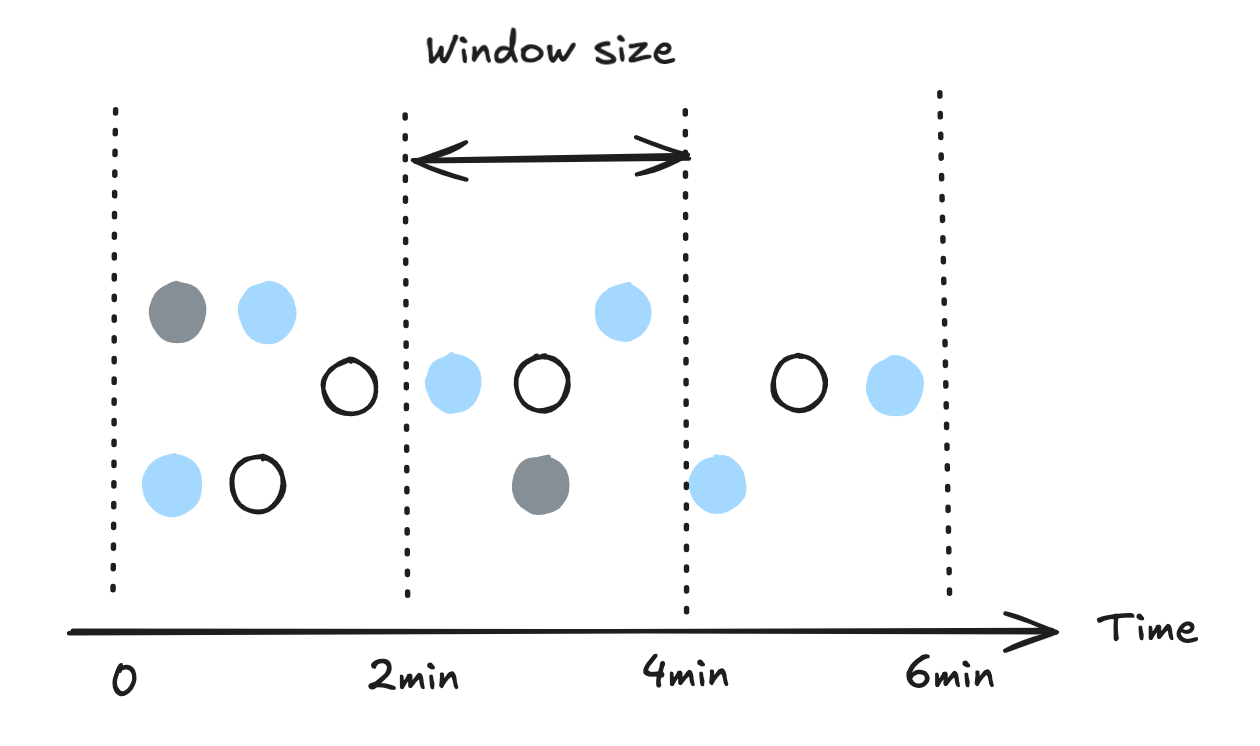 The syntax of the `tumble()` is as follows:
```sql theme={null}
SELECT [ ALL | DISTINCT ] [ * | expression [ AS output_name ] [, expression [ AS output_name ]...] ]
FROM TUMBLE ( table_or_source, time_col, window_size [, offset ] );
```
* *table\_or\_source* specifies the table/source/materialized view that needs to be assigned with time windows.
* *time\_col* specifies the column to determine time windows on. It can be in either timestamp or timestamp with time zone format.
Example of timestamp with time zone format: `2022-01-01 10:00:00+00:00`.
* *window\_size* specifies the size of each time window. It should be a constant value of `INTERVAL` type.
Example: `INTERVAL '2 MINUTES'`. The standard SQL format, which places time units outside of quotation marks (for example, `INTERVAL '2' MINUTE`), is also supported.
* *offset* is an optional parameter that allows you to shift the starting point of each time window.
Example: `window_size = INTERVAL '10 MINUTES', offset = INTERVAL '2 MINUTES'` will yield time window starts like `2022-01-01 00:12:00+00:00`.
Suppose that we have a table, `taxi_trips`, that consists of these columns: `trip_id`, `taxi_id`, `completed_at`, `distance`, and `duration`.
```bash theme={null}
trip_id | taxi_id | completed_at | distance | duration
---------|---------|---------------------|----------|----------
1 | 1001 | 2022-07-01 22:00:00 | 4 | 6
2 | 1002 | 2022-07-01 22:01:00 | 6 | 9
3 | 1003 | 2022-07-01 22:02:00 | 3 | 5
4 | 1004 | 2022-07-01 22:03:00 | 7 | 15
5 | 1005 | 2022-07-01 22:05:00 | 2 | 4
6 | 1006 | 2022-07-01 22:05:30 | 8 | 17
```
Here is an example that uses the tumbling time window function.
```sql theme={null}
SELECT trip_id, taxi_id, completed_at, window_start, window_end
FROM TUMBLE (taxi_trips, completed_at, INTERVAL '2 MINUTES');
```
The result looks like this:
```bash theme={null}
trip_id | taxi_id | completed_at | window_start | window_end
---------+---------+---------------------+---------------------+---------------------
1 | 1001 | 2022-07-01 22:00:00 | 2022-07-01 22:00:00 | 2022-07-01 22:02:00
2 | 1002 | 2022-07-01 22:01:00 | 2022-07-01 22:00:00 | 2022-07-01 22:02:00
3 | 1003 | 2022-07-01 22:02:10 | 2022-07-01 22:02:00 | 2022-07-01 22:04:00
4 | 1004 | 2022-07-01 22:03:00 | 2022-07-01 22:02:00 | 2022-07-01 22:04:00
5 | 1005 | 2022-07-01 22:05:00 | 2022-07-01 22:04:00 | 2022-07-01 22:06:00
6 | 1006 | 2022-07-01 22:06:00 | 2022-07-01 22:06:00 | 2022-07-01 22:08:00
```
### `hop()` time window function
The `hop()` time window function also assigns each row a time window with a fixed size, which is very similar to `tumble()`, except that the assigned time windows may overlap.
The syntax of the `tumble()` is as follows:
```sql theme={null}
SELECT [ ALL | DISTINCT ] [ * | expression [ AS output_name ] [, expression [ AS output_name ]...] ]
FROM TUMBLE ( table_or_source, time_col, window_size [, offset ] );
```
* *table\_or\_source* specifies the table/source/materialized view that needs to be assigned with time windows.
* *time\_col* specifies the column to determine time windows on. It can be in either timestamp or timestamp with time zone format.
Example of timestamp with time zone format: `2022-01-01 10:00:00+00:00`.
* *window\_size* specifies the size of each time window. It should be a constant value of `INTERVAL` type.
Example: `INTERVAL '2 MINUTES'`. The standard SQL format, which places time units outside of quotation marks (for example, `INTERVAL '2' MINUTE`), is also supported.
* *offset* is an optional parameter that allows you to shift the starting point of each time window.
Example: `window_size = INTERVAL '10 MINUTES', offset = INTERVAL '2 MINUTES'` will yield time window starts like `2022-01-01 00:12:00+00:00`.
Suppose that we have a table, `taxi_trips`, that consists of these columns: `trip_id`, `taxi_id`, `completed_at`, `distance`, and `duration`.
```bash theme={null}
trip_id | taxi_id | completed_at | distance | duration
---------|---------|---------------------|----------|----------
1 | 1001 | 2022-07-01 22:00:00 | 4 | 6
2 | 1002 | 2022-07-01 22:01:00 | 6 | 9
3 | 1003 | 2022-07-01 22:02:00 | 3 | 5
4 | 1004 | 2022-07-01 22:03:00 | 7 | 15
5 | 1005 | 2022-07-01 22:05:00 | 2 | 4
6 | 1006 | 2022-07-01 22:05:30 | 8 | 17
```
Here is an example that uses the tumbling time window function.
```sql theme={null}
SELECT trip_id, taxi_id, completed_at, window_start, window_end
FROM TUMBLE (taxi_trips, completed_at, INTERVAL '2 MINUTES');
```
The result looks like this:
```bash theme={null}
trip_id | taxi_id | completed_at | window_start | window_end
---------+---------+---------------------+---------------------+---------------------
1 | 1001 | 2022-07-01 22:00:00 | 2022-07-01 22:00:00 | 2022-07-01 22:02:00
2 | 1002 | 2022-07-01 22:01:00 | 2022-07-01 22:00:00 | 2022-07-01 22:02:00
3 | 1003 | 2022-07-01 22:02:10 | 2022-07-01 22:02:00 | 2022-07-01 22:04:00
4 | 1004 | 2022-07-01 22:03:00 | 2022-07-01 22:02:00 | 2022-07-01 22:04:00
5 | 1005 | 2022-07-01 22:05:00 | 2022-07-01 22:04:00 | 2022-07-01 22:06:00
6 | 1006 | 2022-07-01 22:06:00 | 2022-07-01 22:06:00 | 2022-07-01 22:08:00
```
### `hop()` time window function
The `hop()` time window function also assigns each row a time window with a fixed size, which is very similar to `tumble()`, except that the assigned time windows may overlap.
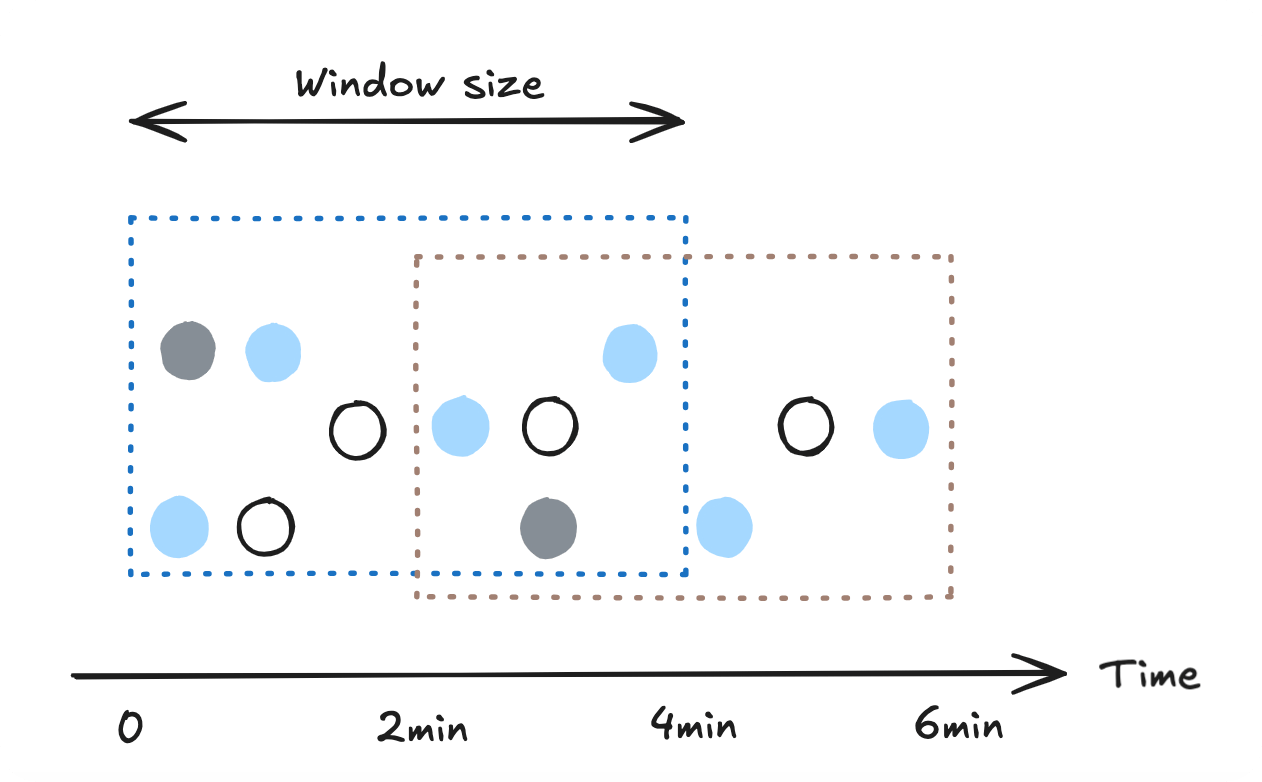 See below for the syntax of the `hop()` time window function.
```sql theme={null}
SELECT [ ALL | DISTINCT] [ * | expression [ AS output_name ] [, expression [ AS output_name ]...] ]
FROM HOP ( table_or_source, time_col, hop_size, window_size [, offset ]);
```
* *table\_or\_source* specifies the table/source/materialized view that needs to be assigned with time windows.
* *time\_col* specifies the column to determine time windows on. It can be in either timestamp or timestamp with time zone format.
Example of timestamp with time zone format: `2022-01-01 10:00:00+00:00`.
* *hop\_size* specifies the size of each hop, *window\_size* specifies the size of each time window. Both should be constant values of `INTERVAL` type.
For example: `INTERVAL '2 MINUTES'`. The standard SQL format, which places time units outside of quotation marks (for example, `INTERVAL '2' MINUTE`), is also supported.
* *offset* is an optional parameter that allows you to shift the starting point of each time window.
Example: `window_size = INTERVAL '10 MINUTES', offset = INTERVAL '2 MINUTES'` will yield time window starts like `2022-01-01 00:12:00+00:00`.
Here is an example.
```sql theme={null}
SELECT trip_id, taxi_id, completed_at, window_start, window_end
FROM HOP (taxi_trips, completed_at, INTERVAL '1 MINUTE', INTERVAL '2 MINUTES');
```
The result looks like the table below. Note that the number of rows in the result of a hop window function is N times the number of rows in the original table, where N is the window size divided by the hop size.
```bash theme={null}
trip_id | taxi_id | completed_at | window_start | window_end
---------+---------+---------------------+---------------------+---------------------
1 | 1001 | 2022-07-01 22:00:00 | 2022-07-01 21:59:00 | 2022-07-01 22:01:00
1 | 1001 | 2022-07-01 22:00:00 | 2022-07-01 22:00:00 | 2022-07-01 22:02:00
2 | 1002 | 2022-07-01 22:01:00 | 2022-07-01 22:00:00 | 2022-07-01 22:02:00
2 | 1002 | 2022-07-01 22:01:00 | 2022-07-01 22:01:00 | 2022-07-01 22:03:00
3 | 1003 | 2022-07-01 22:02:10 | 2022-07-01 22:01:00 | 2022-07-01 22:03:00
3 | 1003 | 2022-07-01 22:02:10 | 2022-07-01 22:02:00 | 2022-07-01 22:04:00
4 | 1004 | 2022-07-01 22:03:00 | 2022-07-01 22:02:00 | 2022-07-01 22:04:00
4 | 1004 | 2022-07-01 22:03:00 | 2022-07-01 22:03:00 | 2022-07-01 22:05:00
5 | 1005 | 2022-07-01 22:05:00 | 2022-07-01 22:04:00 | 2022-07-01 22:06:00
5 | 1005 | 2022-07-01 22:05:00 | 2022-07-01 22:05:00 | 2022-07-01 22:07:00
6 | 1006 | 2022-07-01 22:06:00 | 2022-07-01 22:05:00 | 2022-07-01 22:07:00
6 | 1006 | 2022-07-01 22:06:00 | 2022-07-01 22:06:00 | 2022-07-01 22:08:00
```
### Session windows
In RisingWave, session windows are supported by a special type of window function frame: `SESSION` frame. You can refer to [Window function calls](/sql/query-syntax/value-exp#window-function-calls) for detailed syntax.
Currently, `SESSION` frame is only supported in batch mode and emit-on-window-close streaming mode.
When using session windows, you can achieve the effect that is very similar to `tumble()` and `hop()` time window functions, that is, to assign each row a time window by augmenting it with `window_start` and `window_end`.
See below for the syntax of the `hop()` time window function.
```sql theme={null}
SELECT [ ALL | DISTINCT] [ * | expression [ AS output_name ] [, expression [ AS output_name ]...] ]
FROM HOP ( table_or_source, time_col, hop_size, window_size [, offset ]);
```
* *table\_or\_source* specifies the table/source/materialized view that needs to be assigned with time windows.
* *time\_col* specifies the column to determine time windows on. It can be in either timestamp or timestamp with time zone format.
Example of timestamp with time zone format: `2022-01-01 10:00:00+00:00`.
* *hop\_size* specifies the size of each hop, *window\_size* specifies the size of each time window. Both should be constant values of `INTERVAL` type.
For example: `INTERVAL '2 MINUTES'`. The standard SQL format, which places time units outside of quotation marks (for example, `INTERVAL '2' MINUTE`), is also supported.
* *offset* is an optional parameter that allows you to shift the starting point of each time window.
Example: `window_size = INTERVAL '10 MINUTES', offset = INTERVAL '2 MINUTES'` will yield time window starts like `2022-01-01 00:12:00+00:00`.
Here is an example.
```sql theme={null}
SELECT trip_id, taxi_id, completed_at, window_start, window_end
FROM HOP (taxi_trips, completed_at, INTERVAL '1 MINUTE', INTERVAL '2 MINUTES');
```
The result looks like the table below. Note that the number of rows in the result of a hop window function is N times the number of rows in the original table, where N is the window size divided by the hop size.
```bash theme={null}
trip_id | taxi_id | completed_at | window_start | window_end
---------+---------+---------------------+---------------------+---------------------
1 | 1001 | 2022-07-01 22:00:00 | 2022-07-01 21:59:00 | 2022-07-01 22:01:00
1 | 1001 | 2022-07-01 22:00:00 | 2022-07-01 22:00:00 | 2022-07-01 22:02:00
2 | 1002 | 2022-07-01 22:01:00 | 2022-07-01 22:00:00 | 2022-07-01 22:02:00
2 | 1002 | 2022-07-01 22:01:00 | 2022-07-01 22:01:00 | 2022-07-01 22:03:00
3 | 1003 | 2022-07-01 22:02:10 | 2022-07-01 22:01:00 | 2022-07-01 22:03:00
3 | 1003 | 2022-07-01 22:02:10 | 2022-07-01 22:02:00 | 2022-07-01 22:04:00
4 | 1004 | 2022-07-01 22:03:00 | 2022-07-01 22:02:00 | 2022-07-01 22:04:00
4 | 1004 | 2022-07-01 22:03:00 | 2022-07-01 22:03:00 | 2022-07-01 22:05:00
5 | 1005 | 2022-07-01 22:05:00 | 2022-07-01 22:04:00 | 2022-07-01 22:06:00
5 | 1005 | 2022-07-01 22:05:00 | 2022-07-01 22:05:00 | 2022-07-01 22:07:00
6 | 1006 | 2022-07-01 22:06:00 | 2022-07-01 22:05:00 | 2022-07-01 22:07:00
6 | 1006 | 2022-07-01 22:06:00 | 2022-07-01 22:06:00 | 2022-07-01 22:08:00
```
### Session windows
In RisingWave, session windows are supported by a special type of window function frame: `SESSION` frame. You can refer to [Window function calls](/sql/query-syntax/value-exp#window-function-calls) for detailed syntax.
Currently, `SESSION` frame is only supported in batch mode and emit-on-window-close streaming mode.
When using session windows, you can achieve the effect that is very similar to `tumble()` and `hop()` time window functions, that is, to assign each row a time window by augmenting it with `window_start` and `window_end`.
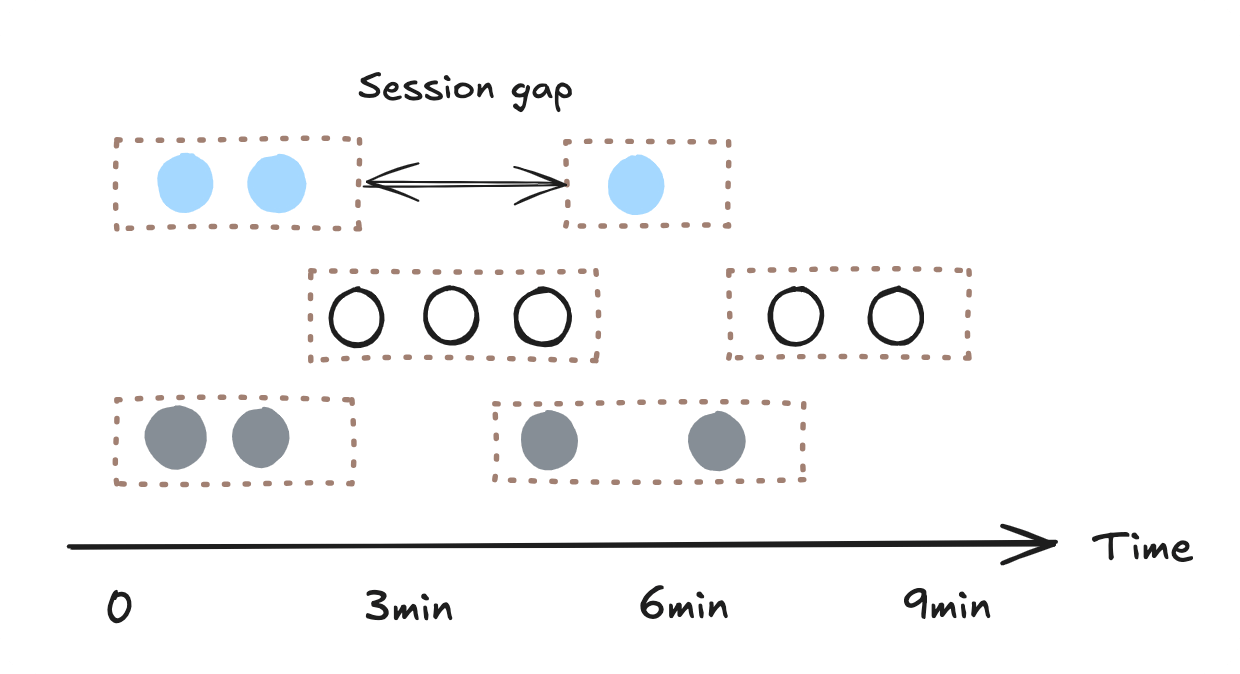 Given the following table data:
```bash theme={null}
user_id | product_id | viewed_at
---------+------------+---------------------
1 | 1001 | 2022-07-01 22:00:00
1 | 1002 | 2022-07-01 22:01:00
1 | 1001 | 2022-07-01 22:03:00
1 | 1003 | 2022-07-01 22:10:00
2 | 1003 | 2022-07-01 22:05:00
2 | 1006 | 2022-07-01 22:05:30
```
And the following query:
```sql theme={null}
SELECT
user_id, product_id, viewed_at,
first_value(viewed_at) OVER (
PARTITION BY user_id ORDER BY viewed_at
SESSION WITH GAP INTERVAL '5 MINUTES'
) AS window_start,
last_value(viewed_at) OVER (
PARTITION BY user_id ORDER BY viewed_at
SESSION WITH GAP INTERVAL '5 MINUTES'
) AS window_end
FROM user_views
```
The result looks like this:
```bash theme={null}
user_id | product_id | viewed_at | window_start | window_end
---------+------------+---------------------+---------------------+---------------------
1 | 1001 | 2022-07-01 22:00:00 | 2022-07-01 22:00:00 | 2022-07-01 22:03:00
1 | 1002 | 2022-07-01 22:01:00 | 2022-07-01 22:00:00 | 2022-07-01 22:03:00
1 | 1001 | 2022-07-01 22:03:00 | 2022-07-01 22:00:00 | 2022-07-01 22:03:00
1 | 1003 | 2022-07-01 22:10:00 | 2022-07-01 22:10:00 | 2022-07-01 22:10:00
2 | 1003 | 2022-07-01 22:05:00 | 2022-07-01 22:05:00 | 2022-07-01 22:05:30
2 | 1006 | 2022-07-01 22:05:30 | 2022-07-01 22:05:00 | 2022-07-01 22:05:30
```
## Window aggregations
Let’s see how we can perform time window aggregations.
### Tumble window aggregations
Below is an example of tumble window aggregation. In this example, we want to get the number of trips and the total distance for each tumbling window (2 minutes).
```sql theme={null}
SELECT window_start, window_end, count(trip_id) AS no_of_trips, sum(distance) AS total_distance
FROM TUMBLE (taxi_trips, completed_at, INTERVAL '2 MINUTES')
GROUP BY window_start, window_end
ORDER BY window_start;
```
The result looks like this:
```bash theme={null}
window_start | window_end | no_of_trips | total_distance
---------------------+---------------------+-------------+----------------
2022-07-01 22:00:00 | 2022-07-01 22:02:00 | 2 | 10
2022-07-01 22:02:00 | 2022-07-01 22:04:00 | 2 | 10
2022-07-01 22:04:00 | 2022-07-01 22:06:00 | 1 | 2
2022-07-01 22:06:00 | 2022-07-01 22:08:00 | 1 | 8
```
### Hop window aggregations
Below is an example of hopping window aggregation. In this example, we want to get the number of trips and the total distance within a two-minute window every minute.
```sql theme={null}
SELECT window_start, window_end, count(trip_id) AS no_of_trips, sum(distance) AS total_distance
FROM HOP (taxi_trips, completed_at, INTERVAL '1 MINUTES', INTERVAL '2 MINUTES')
GROUP BY window_start, window_end
ORDER BY window_start;
```
The result looks like this:
```bash theme={null}
window_start | window_end | no_of_trips | total_distance
---------------------+---------------------+-------------+----------------
2022-07-01 21:59:00 | 2022-07-01 22:01:00 | 1 | 4
2022-07-01 22:00:00 | 2022-07-01 22:02:00 | 2 | 10
2022-07-01 22:01:00 | 2022-07-01 22:03:00 | 2 | 9
2022-07-01 22:02:00 | 2022-07-01 22:04:00 | 2 | 10
2022-07-01 22:03:00 | 2022-07-01 22:05:00 | 1 | 7
2022-07-01 22:04:00 | 2022-07-01 22:06:00 | 1 | 2
2022-07-01 22:05:00 | 2022-07-01 22:07:00 | 2 | 10
2022-07-01 22:06:00 | 2022-07-01 22:08:00 | 1 | 8
```
### Session window aggregations
Below is an example of aggregation over session windows. In this example, we want to get the number of unique products viewed by each user in session gapped by 5 minutes interval, based on the example data in previous [Session windows](#session-windows) section.
```sql theme={null}
SELECT
user_id, window_start,
count(DISTINCT product_id) AS n_viewed_product
FROM (
SELECT
*,
first_value(viewed_at) OVER (
PARTITION BY user_id ORDER BY viewed_at
SESSION WITH GAP INTERVAL '5 MINUTES'
) AS window_start
FROM user_views
)
GROUP BY user_id, window_start
ORDER BY user_id, window_start;
```
The result looks like this:
```bash theme={null}
user_id | window_start | n_viewed_product
---------+---------------------+-----------------
1 | 2022-07-01 22:00:00 | 2
1 | 2022-07-01 22:10:00 | 1
2 | 2022-07-01 22:05:00 | 2
```
## Handle gaps in time windows
If no events occur during specific intervals, gaps may appear in time windows. To ensure continuous and complete time windows, use [`generate_series()`](/sql/functions/set-returning#advanced-usage-of-generating-timestamp) to fill in missing intervals.
### Problem
Consider a dataset of taxi trips where each trip is recorded with a completion timestamp:
```bash theme={null}
trip_id | taxi_id | completed_at | distance | duration
---------+---------+----------------------+----------+----------
1 | 1001 | 2022-07-01 22:00:00 | 4 | 6
2 | 1002 | 2022-07-01 22:01:00 | 6 | 9
3 | 1003 | 2022-07-01 22:02:10 | 3 | 5
4 | 1004 | 2022-07-01 22:03:00 | 7 | 15
5 | 1005 | 2022-07-01 22:07:00 | 2 | 4
6 | 1006 | 2022-07-01 22:08:30 | 8 | 17
```
Using a 2-minute tumbling window, we aggregate the trip counts per window:
```sql theme={null}
SELECT window_start, window_end, COUNT(*) AS trip_count
FROM TUMBLE (taxi_trips, completed_at, INTERVAL '2 MINUTES')
GROUP BY window_start, window_end;
```
The result looks like this:
```bash theme={null}
window_start | window_end | trip_count
---------------------+----------------------+------------
2022-07-01 22:00:00 | 2022-07-01 22:02:00 | 2
2022-07-01 22:02:00 | 2022-07-01 22:04:00 | 2
2022-07-01 22:06:00 | 2022-07-01 22:08:00 | 1
2022-07-01 22:08:00 | 2022-07-01 22:10:00 | 1
```
Here the time window `2022-07-01 22:04:00 - 2022-07-01 22:06:00` is missing because no trips were recorded during that interval.
### Solution
To ensure continuous time windows, we can generate a full range of expected time windows and LEFT JOIN them with the aggregated results.
```sql theme={null}
WITH time_series AS (
SELECT
generate_series(
TIMESTAMP '2022-07-01 22:00:00', -- Start time
NOW(), -- End time
INTERVAL '2 MINUTES' -- Step size
) AS window_start
)
SELECT
ts.window_start,
ts.window_start + INTERVAL '2 MINUTES' AS window_end,
COALESCE(t.trip_count, 0) AS trip_count
FROM time_series ts
LEFT JOIN (
SELECT
window_start,
COUNT(*) AS trip_count
FROM TUMBLE (taxi_trips, completed_at, INTERVAL '2 MINUTES')
GROUP BY window_start
) t
ON ts.window_start = t.window_start
ORDER BY ts.window_start;
```
The final output would be continuous time windows with `0` filling for missing intervals.
```bash theme={null}
window_start | window_end | trip_count
----------------------+----------------------+------------
2022-07-01 22:00:00 | 2022-07-01 22:02:00 | 2
2022-07-01 22:02:00 | 2022-07-01 22:04:00 | 2
2022-07-01 22:04:00 | 2022-07-01 22:06:00 | 0
2022-07-01 22:06:00 | 2022-07-01 22:08:00 | 1
2022-07-01 22:08:00 | 2022-07-01 22:10:00 | 1
```
This approach ensures that every expected time window is included, even if no events occurred in some intervals.
## Window joins
You can join a time window with a table, or another time window that is of the same type and has the same time attributes.
### Joins with tables
Let's see how you can join a time window with a table.
Suppose that you have a simple table `taxi_simple` that has the following data:
```bash theme={null}
taxi_id | company
---------+------------
1001 | SAFE TAXI
1002 | SUPER TAXI
1003 | FAST TAXI
1004 | BEST TAXI
1005 | WEST TAXI
1006 | EAST TAXI
```
You can join it with a time window:
```sql theme={null}
SELECT trip.window_start, trip.window_end, trip.distance, taxi_simple.company
FROM TUMBLE (taxi_trips, completed_at, INTERVAL '2 MINUTES') AS trip
JOIN taxi_simple
ON trip.taxi_id = taxi_simple.taxi_id
ORDER BY trip.window_start;
```
The result looks like this:
```sql theme={null}
window_start | window_end | distance | company
---------------------+---------------------+----------+------------
2022-07-01 22:00:00 | 2022-07-01 22:02:00 | 6 | SAFE TAXI
2022-07-01 22:00:00 | 2022-07-01 22:02:00 | 4 | SUPER TAXI
2022-07-01 22:02:00 | 2022-07-01 22:04:00 | 3 | FAST TAXI
2022-07-01 22:02:00 | 2022-07-01 22:04:00 | 7 | BEST TAXI
2022-07-01 22:04:00 | 2022-07-01 22:06:00 | 2 | WEST TAXI
2022-07-01 22:06:00 | 2022-07-01 22:08:00 | 8 | EAST TAXI
```
### Window joins
You can join two tumble time windows to get both trip and fare information. The corresponding tables are `taxi_trips` and `taxi_fare`.
The `taxi_fare` table has the following data:
```sql theme={null}
trip_id | completed_at | total_fare | payment_status
---------+---------------------+------------+----------------
1 | 2022-07-01 22:00:00 | 8 | COMPLETED
2 | 2022-07-01 22:01:00 | 12 | PROCESSING
3 | 2022-07-01 22:02:10 | 5 | COMPLETED
4 | 2022-07-01 22:03:00 | 15 | COMPLETED
5 | 2022-07-01 22:06:00 | 5 | REJECTED
6 | 2022-07-01 22:06:00 | 20 | COMPLETED
```
You can join two time windows:
```sql theme={null}
SELECT trip.window_start, trip.window_end, trip.distance, fare.total_fare, fare.payment_status
FROM TUMBLE (taxi_trips, completed_at, INTERVAL '2 MINUTES') AS trip
JOIN TUMBLE (taxi_fare, completed_at, INTERVAL '2 MINUTES') AS fare
ON trip.trip_id = fare.trip_id AND trip.window_start = fare.window_start
ORDER BY trip.window_start;
```
The result looks like this.
```bash theme={null}
window_start | window_end | distance | total_fare | payment_status
---------------------+---------------------+----------+------------+----------------
2022-07-01 22:00:00 | 2022-07-01 22:02:00 | 4 | 8 | COMPLETED
2022-07-01 22:00:00 | 2022-07-01 22:02:00 | 6 | 12 | PROCESSING
2022-07-01 22:02:00 | 2022-07-01 22:04:00 | 7 | 15 | COMPLETED
2022-07-01 22:02:00 | 2022-07-01 22:04:00 | 3 | 5 | COMPLETED
2022-07-01 22:04:00 | 2022-07-01 22:06:00 | 2 | 5 | REJECTED
2022-07-01 22:06:00 | 2022-07-01 22:08:00 | 8 | 20 | COMPLETED
```
Given the following table data:
```bash theme={null}
user_id | product_id | viewed_at
---------+------------+---------------------
1 | 1001 | 2022-07-01 22:00:00
1 | 1002 | 2022-07-01 22:01:00
1 | 1001 | 2022-07-01 22:03:00
1 | 1003 | 2022-07-01 22:10:00
2 | 1003 | 2022-07-01 22:05:00
2 | 1006 | 2022-07-01 22:05:30
```
And the following query:
```sql theme={null}
SELECT
user_id, product_id, viewed_at,
first_value(viewed_at) OVER (
PARTITION BY user_id ORDER BY viewed_at
SESSION WITH GAP INTERVAL '5 MINUTES'
) AS window_start,
last_value(viewed_at) OVER (
PARTITION BY user_id ORDER BY viewed_at
SESSION WITH GAP INTERVAL '5 MINUTES'
) AS window_end
FROM user_views
```
The result looks like this:
```bash theme={null}
user_id | product_id | viewed_at | window_start | window_end
---------+------------+---------------------+---------------------+---------------------
1 | 1001 | 2022-07-01 22:00:00 | 2022-07-01 22:00:00 | 2022-07-01 22:03:00
1 | 1002 | 2022-07-01 22:01:00 | 2022-07-01 22:00:00 | 2022-07-01 22:03:00
1 | 1001 | 2022-07-01 22:03:00 | 2022-07-01 22:00:00 | 2022-07-01 22:03:00
1 | 1003 | 2022-07-01 22:10:00 | 2022-07-01 22:10:00 | 2022-07-01 22:10:00
2 | 1003 | 2022-07-01 22:05:00 | 2022-07-01 22:05:00 | 2022-07-01 22:05:30
2 | 1006 | 2022-07-01 22:05:30 | 2022-07-01 22:05:00 | 2022-07-01 22:05:30
```
## Window aggregations
Let’s see how we can perform time window aggregations.
### Tumble window aggregations
Below is an example of tumble window aggregation. In this example, we want to get the number of trips and the total distance for each tumbling window (2 minutes).
```sql theme={null}
SELECT window_start, window_end, count(trip_id) AS no_of_trips, sum(distance) AS total_distance
FROM TUMBLE (taxi_trips, completed_at, INTERVAL '2 MINUTES')
GROUP BY window_start, window_end
ORDER BY window_start;
```
The result looks like this:
```bash theme={null}
window_start | window_end | no_of_trips | total_distance
---------------------+---------------------+-------------+----------------
2022-07-01 22:00:00 | 2022-07-01 22:02:00 | 2 | 10
2022-07-01 22:02:00 | 2022-07-01 22:04:00 | 2 | 10
2022-07-01 22:04:00 | 2022-07-01 22:06:00 | 1 | 2
2022-07-01 22:06:00 | 2022-07-01 22:08:00 | 1 | 8
```
### Hop window aggregations
Below is an example of hopping window aggregation. In this example, we want to get the number of trips and the total distance within a two-minute window every minute.
```sql theme={null}
SELECT window_start, window_end, count(trip_id) AS no_of_trips, sum(distance) AS total_distance
FROM HOP (taxi_trips, completed_at, INTERVAL '1 MINUTES', INTERVAL '2 MINUTES')
GROUP BY window_start, window_end
ORDER BY window_start;
```
The result looks like this:
```bash theme={null}
window_start | window_end | no_of_trips | total_distance
---------------------+---------------------+-------------+----------------
2022-07-01 21:59:00 | 2022-07-01 22:01:00 | 1 | 4
2022-07-01 22:00:00 | 2022-07-01 22:02:00 | 2 | 10
2022-07-01 22:01:00 | 2022-07-01 22:03:00 | 2 | 9
2022-07-01 22:02:00 | 2022-07-01 22:04:00 | 2 | 10
2022-07-01 22:03:00 | 2022-07-01 22:05:00 | 1 | 7
2022-07-01 22:04:00 | 2022-07-01 22:06:00 | 1 | 2
2022-07-01 22:05:00 | 2022-07-01 22:07:00 | 2 | 10
2022-07-01 22:06:00 | 2022-07-01 22:08:00 | 1 | 8
```
### Session window aggregations
Below is an example of aggregation over session windows. In this example, we want to get the number of unique products viewed by each user in session gapped by 5 minutes interval, based on the example data in previous [Session windows](#session-windows) section.
```sql theme={null}
SELECT
user_id, window_start,
count(DISTINCT product_id) AS n_viewed_product
FROM (
SELECT
*,
first_value(viewed_at) OVER (
PARTITION BY user_id ORDER BY viewed_at
SESSION WITH GAP INTERVAL '5 MINUTES'
) AS window_start
FROM user_views
)
GROUP BY user_id, window_start
ORDER BY user_id, window_start;
```
The result looks like this:
```bash theme={null}
user_id | window_start | n_viewed_product
---------+---------------------+-----------------
1 | 2022-07-01 22:00:00 | 2
1 | 2022-07-01 22:10:00 | 1
2 | 2022-07-01 22:05:00 | 2
```
## Handle gaps in time windows
If no events occur during specific intervals, gaps may appear in time windows. To ensure continuous and complete time windows, use [`generate_series()`](/sql/functions/set-returning#advanced-usage-of-generating-timestamp) to fill in missing intervals.
### Problem
Consider a dataset of taxi trips where each trip is recorded with a completion timestamp:
```bash theme={null}
trip_id | taxi_id | completed_at | distance | duration
---------+---------+----------------------+----------+----------
1 | 1001 | 2022-07-01 22:00:00 | 4 | 6
2 | 1002 | 2022-07-01 22:01:00 | 6 | 9
3 | 1003 | 2022-07-01 22:02:10 | 3 | 5
4 | 1004 | 2022-07-01 22:03:00 | 7 | 15
5 | 1005 | 2022-07-01 22:07:00 | 2 | 4
6 | 1006 | 2022-07-01 22:08:30 | 8 | 17
```
Using a 2-minute tumbling window, we aggregate the trip counts per window:
```sql theme={null}
SELECT window_start, window_end, COUNT(*) AS trip_count
FROM TUMBLE (taxi_trips, completed_at, INTERVAL '2 MINUTES')
GROUP BY window_start, window_end;
```
The result looks like this:
```bash theme={null}
window_start | window_end | trip_count
---------------------+----------------------+------------
2022-07-01 22:00:00 | 2022-07-01 22:02:00 | 2
2022-07-01 22:02:00 | 2022-07-01 22:04:00 | 2
2022-07-01 22:06:00 | 2022-07-01 22:08:00 | 1
2022-07-01 22:08:00 | 2022-07-01 22:10:00 | 1
```
Here the time window `2022-07-01 22:04:00 - 2022-07-01 22:06:00` is missing because no trips were recorded during that interval.
### Solution
To ensure continuous time windows, we can generate a full range of expected time windows and LEFT JOIN them with the aggregated results.
```sql theme={null}
WITH time_series AS (
SELECT
generate_series(
TIMESTAMP '2022-07-01 22:00:00', -- Start time
NOW(), -- End time
INTERVAL '2 MINUTES' -- Step size
) AS window_start
)
SELECT
ts.window_start,
ts.window_start + INTERVAL '2 MINUTES' AS window_end,
COALESCE(t.trip_count, 0) AS trip_count
FROM time_series ts
LEFT JOIN (
SELECT
window_start,
COUNT(*) AS trip_count
FROM TUMBLE (taxi_trips, completed_at, INTERVAL '2 MINUTES')
GROUP BY window_start
) t
ON ts.window_start = t.window_start
ORDER BY ts.window_start;
```
The final output would be continuous time windows with `0` filling for missing intervals.
```bash theme={null}
window_start | window_end | trip_count
----------------------+----------------------+------------
2022-07-01 22:00:00 | 2022-07-01 22:02:00 | 2
2022-07-01 22:02:00 | 2022-07-01 22:04:00 | 2
2022-07-01 22:04:00 | 2022-07-01 22:06:00 | 0
2022-07-01 22:06:00 | 2022-07-01 22:08:00 | 1
2022-07-01 22:08:00 | 2022-07-01 22:10:00 | 1
```
This approach ensures that every expected time window is included, even if no events occurred in some intervals.
## Window joins
You can join a time window with a table, or another time window that is of the same type and has the same time attributes.
### Joins with tables
Let's see how you can join a time window with a table.
Suppose that you have a simple table `taxi_simple` that has the following data:
```bash theme={null}
taxi_id | company
---------+------------
1001 | SAFE TAXI
1002 | SUPER TAXI
1003 | FAST TAXI
1004 | BEST TAXI
1005 | WEST TAXI
1006 | EAST TAXI
```
You can join it with a time window:
```sql theme={null}
SELECT trip.window_start, trip.window_end, trip.distance, taxi_simple.company
FROM TUMBLE (taxi_trips, completed_at, INTERVAL '2 MINUTES') AS trip
JOIN taxi_simple
ON trip.taxi_id = taxi_simple.taxi_id
ORDER BY trip.window_start;
```
The result looks like this:
```sql theme={null}
window_start | window_end | distance | company
---------------------+---------------------+----------+------------
2022-07-01 22:00:00 | 2022-07-01 22:02:00 | 6 | SAFE TAXI
2022-07-01 22:00:00 | 2022-07-01 22:02:00 | 4 | SUPER TAXI
2022-07-01 22:02:00 | 2022-07-01 22:04:00 | 3 | FAST TAXI
2022-07-01 22:02:00 | 2022-07-01 22:04:00 | 7 | BEST TAXI
2022-07-01 22:04:00 | 2022-07-01 22:06:00 | 2 | WEST TAXI
2022-07-01 22:06:00 | 2022-07-01 22:08:00 | 8 | EAST TAXI
```
### Window joins
You can join two tumble time windows to get both trip and fare information. The corresponding tables are `taxi_trips` and `taxi_fare`.
The `taxi_fare` table has the following data:
```sql theme={null}
trip_id | completed_at | total_fare | payment_status
---------+---------------------+------------+----------------
1 | 2022-07-01 22:00:00 | 8 | COMPLETED
2 | 2022-07-01 22:01:00 | 12 | PROCESSING
3 | 2022-07-01 22:02:10 | 5 | COMPLETED
4 | 2022-07-01 22:03:00 | 15 | COMPLETED
5 | 2022-07-01 22:06:00 | 5 | REJECTED
6 | 2022-07-01 22:06:00 | 20 | COMPLETED
```
You can join two time windows:
```sql theme={null}
SELECT trip.window_start, trip.window_end, trip.distance, fare.total_fare, fare.payment_status
FROM TUMBLE (taxi_trips, completed_at, INTERVAL '2 MINUTES') AS trip
JOIN TUMBLE (taxi_fare, completed_at, INTERVAL '2 MINUTES') AS fare
ON trip.trip_id = fare.trip_id AND trip.window_start = fare.window_start
ORDER BY trip.window_start;
```
The result looks like this.
```bash theme={null}
window_start | window_end | distance | total_fare | payment_status
---------------------+---------------------+----------+------------+----------------
2022-07-01 22:00:00 | 2022-07-01 22:02:00 | 4 | 8 | COMPLETED
2022-07-01 22:00:00 | 2022-07-01 22:02:00 | 6 | 12 | PROCESSING
2022-07-01 22:02:00 | 2022-07-01 22:04:00 | 7 | 15 | COMPLETED
2022-07-01 22:02:00 | 2022-07-01 22:04:00 | 3 | 5 | COMPLETED
2022-07-01 22:04:00 | 2022-07-01 22:06:00 | 2 | 5 | REJECTED
2022-07-01 22:06:00 | 2022-07-01 22:08:00 | 8 | 20 | COMPLETED
```