> ## Documentation Index
> Fetch the complete documentation index at: https://docs.risingwave.com/llms.txt
> Use this file to discover all available pages before exploring further.
# Data processing in RisingWave
> Process streaming data in real time with RisingWave using PostgreSQL-compatible SQL. Create materialized views for incremental computation, run ad-hoc queries, and build continuous data pipelines.
RisingWave processes streaming data in real time using PostgreSQL-compatible SQL. You can define continuous streaming pipelines with `CREATE MATERIALIZED VIEW` for incremental computation that automatically updates as new data arrives, or run ad-hoc `SELECT` queries for on-demand batch analysis. Both modes use the same SQL syntax — no need to learn a separate streaming API or DSL.
## Declare data processing logic in SQL
RisingWave uses PostgreSQL-compatible SQL as the interface for declaring data processing logic. This design provides two key benefits:
**Easy to use**: By aligning with PostgreSQL's syntax, functions, and data types, RisingWave minimizes the learning curve. Even for creating streaming jobs, there is no need to learn streaming-specific concepts — just write standard SQL.
**Powerful**: RisingWave fully supports advanced SQL features including OVER window functions, multi-way JOINs (inner, outer, cross), time-windowed aggregations (tumble, hop, session), and semi-structured data types (JSONB, arrays, structs).
## Ad hoc (on read) vs. Streaming (on write)
There are 2 execution modes in our system serving different analytics purposes. The results of these two modes are the same and the difference lies in the timing of data processing, whether it occurs at the time of data ingestion(on write) or when the query is executed(on read).
### Understanding execution modes
**Streaming**: RisingWave allows users to predefine SQL queries with [CREATE MATERIALIZED VIEW](/sql/commands/sql-create-mv) statement. RisingWave continuously listens changes in upstream tables (in the `FROM` clause) and incrementally update the results automatically.
**Ad-hoc**: Also like traditional databases, RisingWave allows users to send [SELECT](/sql/commands/sql-select) statement to query the result. At this point, RisingWave reads the data from the current snapshot, processes it, and returns the results.
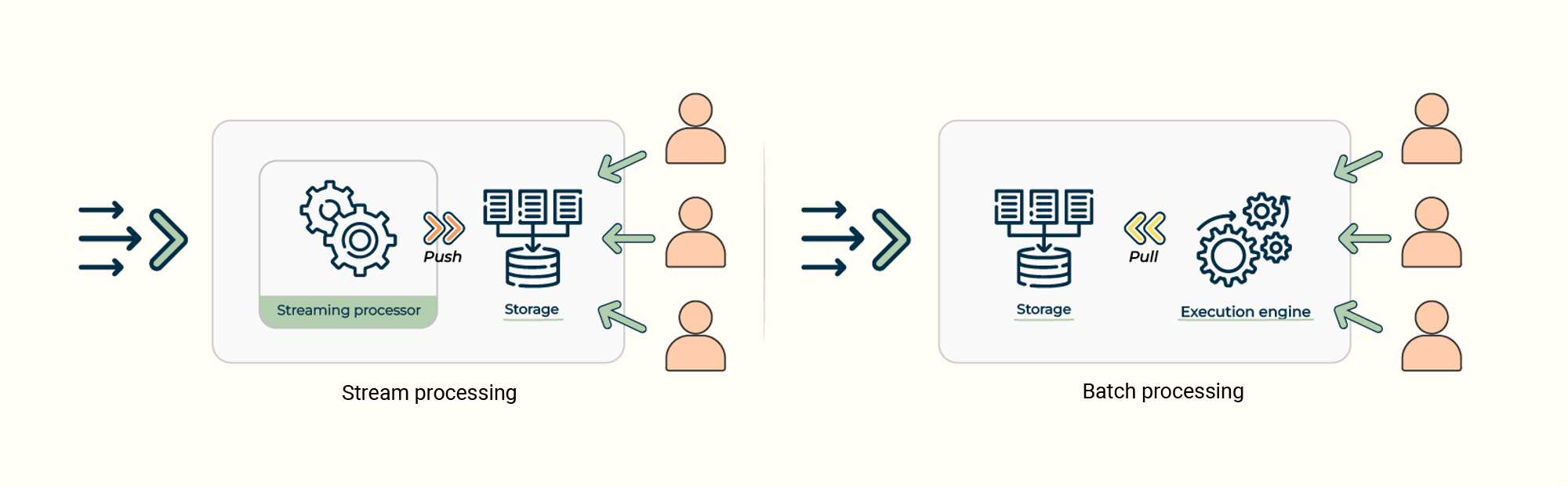 Both modes have their unique advantages. Here are some considerations:
**Cost & Performance**: Compared to traditional databases, streaming mode can pre-compute and store results. The heavy lifting is done upfront, eliminating duplicate computation over each ad hoc query, and therefore has better performance and a lower cost.
**Flexibility**: The streaming mode is less flexible to changes in query requirements. The ad-hoc query usually is created on-the-fly to fulfill immediate and specific information needs. Unlike predefined queries, ad-hoc queries are generated in real-time based on your current requirements. They are commonly used in data analysis, decision-making, and exploratory data tasks, where flexibility and quick access to information are crucial.
### Query execution modes
When executing ad-hoc batch queries with `SELECT`, you can control the execution mode using the `QUERY_MODE` session variable:
* `distributed` (default): Distributes query execution across multiple compute nodes for better parallelism. Use this for complex queries over large datasets.
* `local`: Executes the query on a single node. Use this for simple queries or when network overhead is a concern.
* `auto`: Lets RisingWave choose the appropriate mode based on query characteristics.
```sql theme={null}
SET QUERY_MODE TO distributed;
SELECT * FROM large_table WHERE condition;
```
## Examples
### Create a table
To illustrate, let's consider a hypothetical scenario where we have a table called `sales_data`. This table stores information about product IDs (`product_id`) and their corresponding sales amounts (`sales_amount`).
```bash table of sales_data theme={null}
product_id | sales_amount
------------+--------------
1 | 75
2 | 150
2 | 125
1 | 100
3 | 200
```
You can use the following statement to create this table.
```sql theme={null}
CREATE TABLE sales_data (
product_id INT,
sales_amount INT
);
INSERT INTO sales_data (product_id, sales_amount)
VALUES
(1, 100),
(1, 75),
(2, 150),
(2, 125),
(3, 200);
```
### Create a materialized view to build continuous streaming pipeline
Based on the `sales_data` table, we can create a materialized view called `mv_sales_summary` to calculate the total sales amount for each product.
```sql theme={null}
CREATE MATERIALIZED VIEW mv_sales_summary AS
SELECT product_id, SUM(sales_amount) AS total_sales
FROM sales_data
GROUP BY product_id;
```
By the SQL statement above, you have successfully transformed the data from the `sales_data` table into a materialized view called `mv_sales_summary`. This materialized view provides the total sales amount for each product. Utilizing materialized views allows for precomputing and storing aggregated data, which in turn improves query performance and simplifies data analysis tasks.
### Ad-hoc query on materialized view's result
Then we can directly query the materialized view to retrieve the transformed data:
```sql theme={null}
SELECT * FROM mv_sales_summary;
----RESULT
product_id | total_sales
------------+-------------
1 | 175
2 | 275
3 | 200
(3 rows)
```
Also, analysts or applications can send more flexible and complex ad-hoc queries, such as querying how many products have higher sales volumes than a specific product
```sql theme={null}
SELECT count(*) FROM mv_sales_summary where mv_sales_summary.total_sales >
(SELECT total_sales FROM mv_sales_summary where product_id = 1);
----RESULT
count
-------
2
(1 row)
```
## See also
* [What is a Materialized View?](/reference/what-is-materialized-view) — How incremental maintenance and cascading views work
* [Data ingestion](/ingestion/overview) — How data enters RisingWave before processing
* [Data delivery](/delivery/overview) — How to send processed results to downstream systems
* [CREATE MATERIALIZED VIEW](/sql/commands/sql-create-mv) — SQL reference
Both modes have their unique advantages. Here are some considerations:
**Cost & Performance**: Compared to traditional databases, streaming mode can pre-compute and store results. The heavy lifting is done upfront, eliminating duplicate computation over each ad hoc query, and therefore has better performance and a lower cost.
**Flexibility**: The streaming mode is less flexible to changes in query requirements. The ad-hoc query usually is created on-the-fly to fulfill immediate and specific information needs. Unlike predefined queries, ad-hoc queries are generated in real-time based on your current requirements. They are commonly used in data analysis, decision-making, and exploratory data tasks, where flexibility and quick access to information are crucial.
### Query execution modes
When executing ad-hoc batch queries with `SELECT`, you can control the execution mode using the `QUERY_MODE` session variable:
* `distributed` (default): Distributes query execution across multiple compute nodes for better parallelism. Use this for complex queries over large datasets.
* `local`: Executes the query on a single node. Use this for simple queries or when network overhead is a concern.
* `auto`: Lets RisingWave choose the appropriate mode based on query characteristics.
```sql theme={null}
SET QUERY_MODE TO distributed;
SELECT * FROM large_table WHERE condition;
```
## Examples
### Create a table
To illustrate, let's consider a hypothetical scenario where we have a table called `sales_data`. This table stores information about product IDs (`product_id`) and their corresponding sales amounts (`sales_amount`).
```bash table of sales_data theme={null}
product_id | sales_amount
------------+--------------
1 | 75
2 | 150
2 | 125
1 | 100
3 | 200
```
You can use the following statement to create this table.
```sql theme={null}
CREATE TABLE sales_data (
product_id INT,
sales_amount INT
);
INSERT INTO sales_data (product_id, sales_amount)
VALUES
(1, 100),
(1, 75),
(2, 150),
(2, 125),
(3, 200);
```
### Create a materialized view to build continuous streaming pipeline
Based on the `sales_data` table, we can create a materialized view called `mv_sales_summary` to calculate the total sales amount for each product.
```sql theme={null}
CREATE MATERIALIZED VIEW mv_sales_summary AS
SELECT product_id, SUM(sales_amount) AS total_sales
FROM sales_data
GROUP BY product_id;
```
By the SQL statement above, you have successfully transformed the data from the `sales_data` table into a materialized view called `mv_sales_summary`. This materialized view provides the total sales amount for each product. Utilizing materialized views allows for precomputing and storing aggregated data, which in turn improves query performance and simplifies data analysis tasks.
### Ad-hoc query on materialized view's result
Then we can directly query the materialized view to retrieve the transformed data:
```sql theme={null}
SELECT * FROM mv_sales_summary;
----RESULT
product_id | total_sales
------------+-------------
1 | 175
2 | 275
3 | 200
(3 rows)
```
Also, analysts or applications can send more flexible and complex ad-hoc queries, such as querying how many products have higher sales volumes than a specific product
```sql theme={null}
SELECT count(*) FROM mv_sales_summary where mv_sales_summary.total_sales >
(SELECT total_sales FROM mv_sales_summary where product_id = 1);
----RESULT
count
-------
2
(1 row)
```
## See also
* [What is a Materialized View?](/reference/what-is-materialized-view) — How incremental maintenance and cascading views work
* [Data ingestion](/ingestion/overview) — How data enters RisingWave before processing
* [Data delivery](/delivery/overview) — How to send processed results to downstream systems
* [CREATE MATERIALIZED VIEW](/sql/commands/sql-create-mv) — SQL reference