> ## Documentation Index
> Fetch the complete documentation index at: https://docs.risingwave.com/llms.txt
> Use this file to discover all available pages before exploring further.
# Install psql without PostgreSQL
> To use RisingWave, you need a PostgreSQL client, not the PostgreSQL server. The PostgreSQL [official installers and packages](https://www.postgresql.org/download/) come with all the components needed to run a PostgreSQL server, but some of these components are not needed for RisingWave.
[psql](https://www.postgresql.org/docs/current/app-psql.html), which is included in the PostgreSQL package, is a command-line interface for interacting with PostgreSQL databases. As RisingWave is wire-compatible with PostgreSQL, `psql` becomes an essential tool for you to connect to RisingWave, issue SQL queries, and manage database objects.
To install `psql` without the rest of the PostgreSQL package, you can use your operating system's package manager. Here are the steps to install psql on some common operating systems:
1. Install [Homebrew](https://brew.sh) if you don't have it on your mac.
2. Update package definitions (formulae).
```bash theme={null}
brew update
```
3. Install [libpq](https://www.postgresql.org/docs/current/libpq.html).
```bash theme={null}
brew install libpq
```
> Homebrew's package for the PostgreSQL client tools is `libpq`, which includes `psql`, `pg_dump`, and other client utilities.
4. Link all binaries of `libpq` to `/usr/local/bin`.
```bash theme={null}
brew link --force libpq
```
> `libpq` does not install itself in the `/usr/local/bin` directory. Thus, you need to link them to the directory to use the installed binaries.
1. Update apt's package list.
```bash theme={null}
sudo apt update
```
2. Install the client packages.
```bash theme={null}
sudo apt install postgresql-client
```
1. Install the repository RPM to point YUM at the PostgreSQL repository.
Go to [Linux Downloads (Red Hat Family)](https://www.postgresql.org/download/linux/redhat/) and select your platform for the command and repository URL.
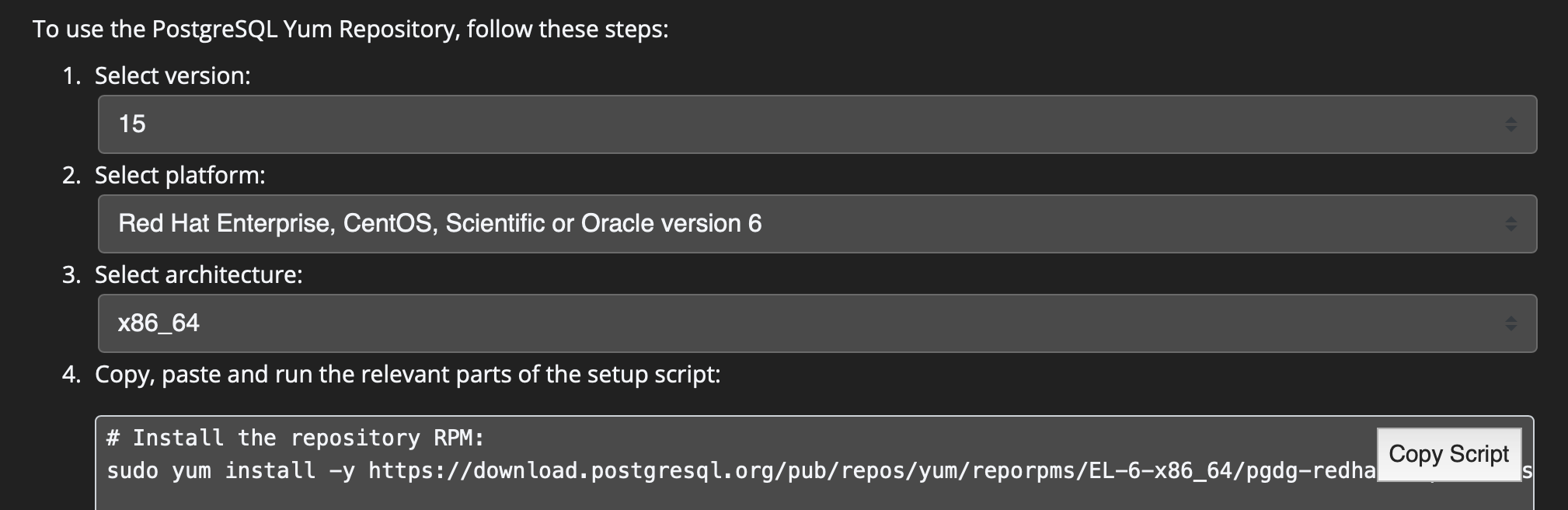 2. Install the latest client packages.
```bash theme={null}
sudo yum install postgresql
```
> Strange as it may seem, `postgresql` is the right package we are looking for in YUM.
> `postgresql` — PostgreSQL client programs including `psql`
> `postgresql-server` — The complete set of programs required to set up a PostgreSQL server
Simply run:
```bash theme={null}
sudo dnf install postgresql.x86_64
```
> `postgresql` represents the PostgreSQL client programs including `psql` in DNF.
For Windows users, please use the [interactive installer by EDB](https://www.postgresql.org/download/windows/).
This is the usual way of installing PostgreSQL on Windows. But to install the client only, select **Command Line Tools** and uncheck other options when selecting components during installation.
2. Install the latest client packages.
```bash theme={null}
sudo yum install postgresql
```
> Strange as it may seem, `postgresql` is the right package we are looking for in YUM.
> `postgresql` — PostgreSQL client programs including `psql`
> `postgresql-server` — The complete set of programs required to set up a PostgreSQL server
Simply run:
```bash theme={null}
sudo dnf install postgresql.x86_64
```
> `postgresql` represents the PostgreSQL client programs including `psql` in DNF.
For Windows users, please use the [interactive installer by EDB](https://www.postgresql.org/download/windows/).
This is the usual way of installing PostgreSQL on Windows. But to install the client only, select **Command Line Tools** and uncheck other options when selecting components during installation.